How Does Libby Work? A Simple Guide to Free Library Books
Libby is a free app that lets you borrow ebooks, audiobooks, and digital magazines from your local library using your library card. You download the app, add your card, then borrow a title and read or listen right in the app, or send ebooks to a Kindle.
If every copy of a book is checked out, you place a hold and wait your turn. There is no subscription and nothing to pay.
That last part surprises people. Libby is completely free, funded by your library, yet it works like a polished reading app. The one thing that confuses newcomers is the waiting, and there is a good reason for it. This guide walks through how Libby works step by step, why holds happen, and the tricks regular users rely on to skip the line.
What Is Libby?
Libby is the official library reading app from OverDrive, the company that supplies digital books to libraries. It replaced the older OverDrive app, whose support ended in early 2023. Through Libby, you borrow ebooks, audiobooks, and magazines your library owns, free with a library card.
Libby is widely available. OverDrive reports that more than 90% of public libraries in North America use its service, and Libby works with libraries in 78 countries. So if you have a library card, there is a strong chance Libby works with your library.
What Do You Need to Use Libby?
You need three things: a library card from a participating library, the Libby app or the website at libbyapp.com, and a phone, tablet, or computer. That is it. The app and every book on it are free, with no credits, subscriptions, or late fees.
If you do not have a library card yet, Libby can help you find your local library and sign up for a digital card inside the app.
How Does the Libby App Work, Step by Step?
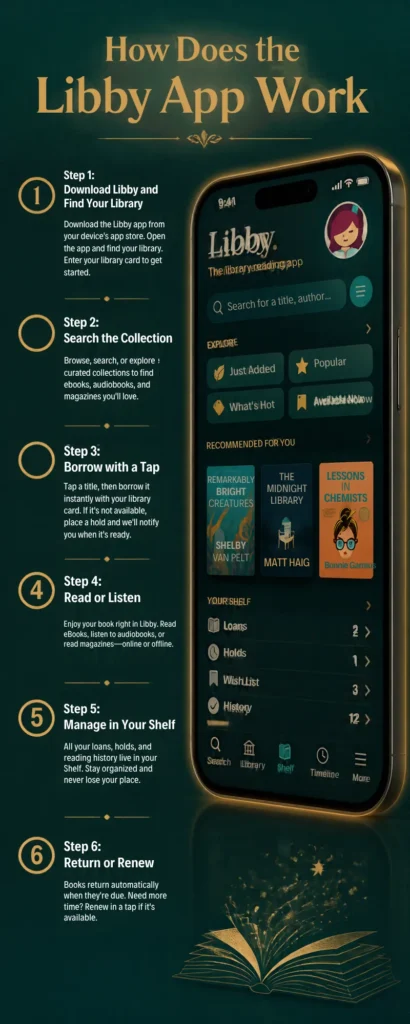
Using Libby takes about five minutes to set up, then borrowing becomes second nature. Here is the full flow from install to reading.
Step 1: Download Libby and Find Your Library
Install Libby from the Apple App Store, Google Play, or the Amazon Appstore, or go to libbyapp.com in a browser. Open it and let it find your library by name, branch, or ZIP code. You can also search manually if your library belongs to a larger consortium.
Step 2: Sign In With Your Library Card
Tap “Sign in with my card,” choose your library, and enter your card number and PIN. This links your card to Libby and opens your library’s full digital collection. You can add more than one card later, which is a powerful trick we cover below.
Step 3: Find a Book
Browse your library’s home page, use the search icon for a specific title or author, or apply filters. The filters are where Libby gets useful. You can show only ebooks or only audiobooks, limit by genre or age, or tap “Available Now” to see titles you can borrow instantly with no wait.
Step 4: Borrow the Title
When a title is available, tap “Borrow,” pick your loan length, and confirm. Most libraries let you choose 7, 14, or 21 days. Picking 21 days up front gives you the most time, so you are less likely to run out before you finish.
Step 5: Read or Listen
After borrowing, tap “Read With” to open the book. You can read or listen inside Libby, or send an ebook to a Kindle. An easy visual tip: ebooks show as rectangular covers, while audiobooks appear more square with a small headphones icon and a listening time.
Step 6: Return or Renew
Libby returns books automatically at the end of the loan, so you never owe a late fee. If you finish early, open the title, tap “Manage Loan,” and choose “Return Early” to send it to the next reader. If no one is waiting, you can usually renew near the due date.
How Does Borrowing on Libby Work?
Borrowing on Libby mirrors a physical library. Each title has a set number of digital copies, and one copy goes to one reader at a time. When a copy is free, you borrow it instantly. When all copies are out, you join a holds list, and Libby notifies you when it is your turn.
Your library sets how many titles you can borrow and hold at once, and these limits vary. Some libraries allow around 10, others up to 20 or more, with separate caps for loans and holds.
Why Do You Have to Wait for a Libby Book?
Because libraries do not own Libby books outright, they license them, and most licenses allow only one reader per copy at a time. A digital file could technically be copied endlessly, but publishers sell libraries limited lending rights instead, so a borrowed ebook behaves like a single physical copy.
This is the question that frustrates new users most. “It’s a digital file,” people say, “why is there a line?” The answer is the business of library licensing, not a flaw in the app.
How Library Ebook Licenses Actually Work
Libraries usually buy metered licenses that expire after a set time, often one to two years, or a set number of checkouts, commonly around 26, after which the library must repurchase the title. These licenses also cost far more than a consumer copy.
For real numbers, that library noted one ebook license for Stephen King’s “Never Flinch” costs $67.99 and expires after two years, while the audiobook license costs $129.99. That high cost is why libraries cannot buy unlimited copies, and why popular titles have waits.
Are Libby Wait Times Really That Long?
Usually not. The estimated wait assumes every person ahead of you keeps the book for the full loan period, which rarely happens. Most readers finish early or return early, so a posted “12 week” wait often arrives in days or a couple of weeks.
The fix most regular users rely on is simple: keep a full queue of holds so something is always arriving, and read “Available Now” titles while you wait.
How Do Holds Work on Libby?
When a title is checked out, you place a hold, and Libby shows your position in line and an estimated wait. Once a copy frees up, you get a notification and a window to borrow it. Note that holds do not wait forever; under a 2025 OverDrive policy, holds expire after two years.
How Does Skip the Line Work?
Skip the Line, sometimes called Lucky Day, is a filter some libraries offer that shows popular titles made available immediately with no hold. If your library has it, you will see a Skip the Line filter in search. You borrow these on the spot, but they often come with a shorter loan period.
How Does Deliver Later Work?
Deliver Later lets you delay a hold that has become available without losing your place. When a book is ready but you are not, choose “Deliver Later” and set a delay, often up to a week or more. This stops all your holds from arriving at once, a common headache for anyone with a long list.
How Does Suspending a Hold Work?
Suspending a hold keeps you on the waitlist while letting others pass you, so your turn is paused until you are ready. Open the hold, tap “Manage Hold,” and choose to suspend it for a set number of days. It is useful when you are traveling or working through other books.
How Does Libby Work for Audiobooks?
Libby works the same way for audiobooks as for ebooks. You borrow the title, tap “Open Audiobook,” and it plays in the app, with the whole file downloaded for offline listening. Audiobooks have their own holds and waits, since each copy is licensed separately from the ebook.
Libby is one of the best free ways to listen, and many readers drop paid services once they find it. If you want to compare it with other options, see our guide to the best audiobook apps.
How Does Libby Work With Kindle?
In the United States, you can send borrowed Libby ebooks to a Kindle instead of reading in the app. After borrowing, tap “Read With,” choose Kindle, sign in to Amazon, and the book is delivered to your device. This feature is for US libraries only (OverDrive), and audiobooks cannot be sent to a Kindle.
For the full walkthrough, including fixes when a book will not appear, see our guide on how to get Libby on Kindle.
Does Libby Work on All Devices?
Libby works on most everyday devices, though not every single one. Here is the quick rundown:
- iPhone and iPad, through the Apple App Store
- Android phones and tablets, through Google Play
- Amazon Fire tablets, through the Amazon Appstore
- Any computer, through libbyapp.com in a browser
- Kindle e-readers, by sending borrowed ebooks (US libraries only)
How to Get More Out of Libby
Once you know the basics, a few habits make Libby far more powerful. These come straight from heavy users:
Libby vs Hoopla
Both are free library apps, but they lend differently. Libby uses the one-copy-one-reader model, so popular titles have holds. Hoopla, where a library offers it, has no waits because the library pays per checkout, but it usually caps how many items you can borrow each month.
So is there a better app than Libby? Not really, since they do different jobs. Many readers use both, Hoopla for instant access and Libby for a deeper catalog. Your access to either depends entirely on what your library provides.
Is Libby Free and Legit?
Yes, on both counts. Libby is a legitimate app from OverDrive, a long-established library technology company, and it is genuinely free with a library card. There are no hidden fees, no ads, and no catch. Your library has already paid for the content through its budget and your taxes.
The only real cost is patience during a wait, and the tricks above make even that minor.
Frequently Asked Questions
This guide is based on hands-on use of the Libby app and verified against OverDrive’s official information and public library resources. Features and library policies can vary and change, so check your own library’s Libby collection and Libby Help for the latest details.