
Reading.com Reviews: An Honest Look at the Popular Phonics App
Reading.com is a parent-led phonics app that does one thing well, teaching a young child to decode and read their first books. Most parents rate it highly for ages 4 to 7, and it costs $74.99 a year. It is not a full reading curriculum, and you will need something else after it.
I pulled together Reading.com reviews from Reddit, Facebook homeschool groups, and detailed YouTube walkthroughs, including one from a linguist, then checked the pricing and claims against official sources. This review covers what the app actually does, what it costs, where it shines, and where it falls short, so you can decide before you pay.
What Is Reading.com?
Reading.com is a phonics and learn-to-read app for young children, built around short daily lessons that a parent and child complete together. Listed in the store as “Learn to Read – Reading.com,” it is made by Teaching.com, the company behind Typing.com, which says it has worked with over 75 million students.
The core idea is structured literacy. The app teaches letter sounds, blending, and decoding in a fixed order, then moves the child into simple decodable books. The parent reads a script the app provides, so you do not need any teaching background to run a lesson.
How Does Reading.com Work?
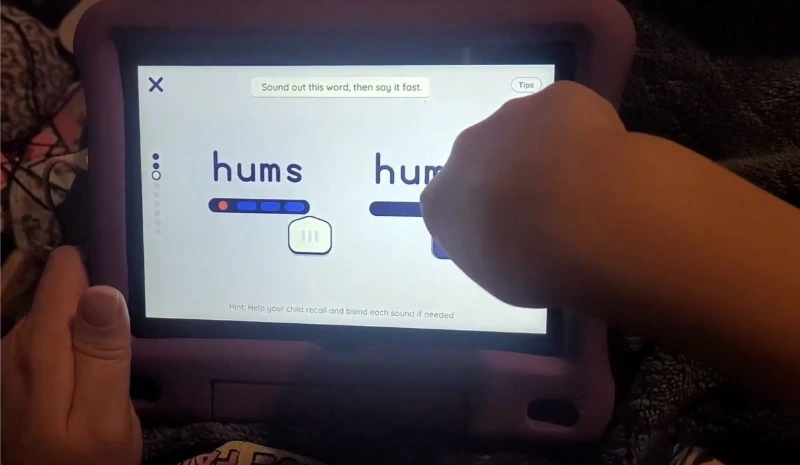
Each lesson runs about 20 minutes and follows the same predictable flow. The app supplies the words for you to say, and your child responds, traces letters, and reads. Lessons are gated, so your child completes each section in order and cannot skip ahead.
What a Typical Lesson Looks Like
A standard lesson moves through a handful of repeating sections:
- An alphabet song to warm up
- A review of letters and sounds already learned
- A “sound story” to listen for a target sound
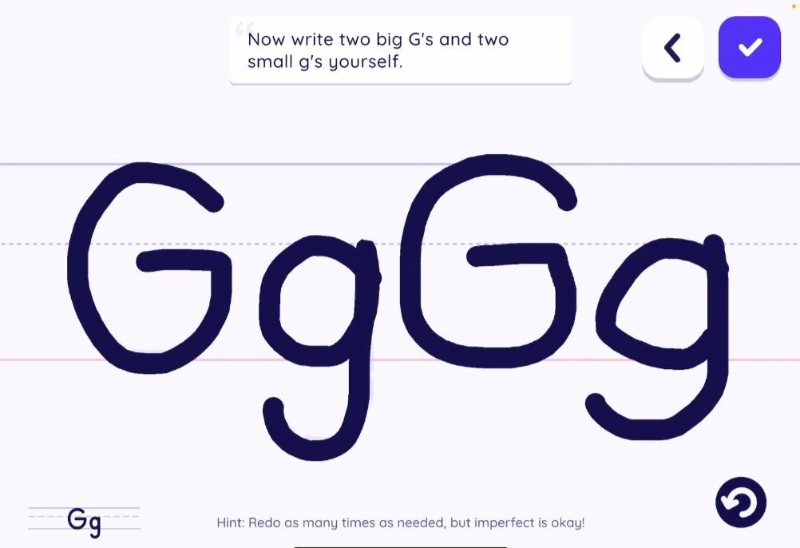
- Letter tracing and writing practice
- A quick check before moving on
- Word reading, then reading an actual book
- A few comprehension questions about the story
Shorter review lessons appear along the way to reinforce earlier skills.
The Sliders and Co-Reading Books
The feature parents mention most is the sliders. As your child moves a finger under a word, the letters light up in sequence, which makes blending sounds feel physical instead of abstract. Reviewers across YouTube call this the app’s standout tool.
Early books are co-reads. You read the gray text, and your child reads the words marked for them. Book illustrations stay hidden until after your child reads the page, which is a deliberate choice to stop kids from guessing a word from the picture.
How Much Does Reading.com Cost?
If you are wondering how much Reading.com is, the app costs $12.49 per month or $74.99 per year, which works out to about $6.25 a month when billed annually. One subscription typically covers multiple children on a single family account. Prices can vary by platform and change over time, so check the app before you buy.
You may see a much higher figure floating around online. One Reddit commenter claimed it costs “$500/month,” which is simply wrong. The real price is well under a hundred dollars a year.
Is There a Free Trial?
Yes. Reading.com offers a free trial before your first payment, so you can test the lessons before committing. Just remember that a trial usually converts to a paid plan automatically unless you cancel first.
Is Reading.com Ever Free?
Not fully. The app is free to download with in-app purchases, but the actual lessons sit behind a subscription after the trial. There is no permanent free tier the way some library apps offer.
What Age Is Reading.com For?
Reading.com works best for children roughly ages 4 to 7, though plenty of parents start earlier. The app is listed as made for ages 0 to 5, but real usage skews a bit older once actual reading begins.
Parents of 3-year-olds report mixed results. Some toddlers beg to do a lesson every morning, while others are not developmentally ready to retain much. One parent summed it up well: at 3, “it couldn’t hurt to try,” but do not expect solid retention. For a 4 or 5-year-old showing interest in letters, the fit is much stronger.
If you want more options for this age group, see our guide to the best reading apps for kids.
How Many Lessons Does Reading.com Have?
Reading.com is commonly described as a 99-lesson program that takes a child from letter recognition to early reading. The curriculum has grown over time, and one 2025 linguist review documented a 120-lesson scope and sequence.
At a pace of three lessons a week, families often finish in roughly 30 to 35 weeks. The company caps lessons at one per day, though some parents flex that rule.
What Reading Level Does Reading.com Reach?
By the end of the program, Reading.com gets most children to a late first-grade or early second-grade reading level. That ceiling is consistent across parent reports and the linguist review. After the final lesson, your child will decode simple books but will need new material to keep progressing.
One homeschool parent on Reddit finished all 99 lessons and said it took their child “from letter recognition to 2nd grade level in 33 weeks,” with no extra phonics teaching needed. Results like that are common, but not guaranteed for every child.
What Parents Actually Say
Across Reddit, Facebook groups, and YouTube, Reading.com earns mostly positive reviews, with a few honest complaints that come up again and again. Here are the real Reading.com reviews and complaints, not the ad version.
What Parents Love
- It is genuinely easy for an untrained parent to teach, because the app scripts every word.
- The sliders and co-reading format help kids blend sounds and build confidence fast.
- Lessons are short enough to hold a young child’s attention, around 15 to 20 minutes.
- Many kids ask to do their lesson, and some finish reading real signs and labels in public.
- One parent of a child with ADHD said the structured, short format worked where other apps had failed.
Common Complaints
- For some kids, it becomes a daily fight. As one parent put it, the lessons turned into a battle and their child “completely shuts down.”
- A few parents feel the lessons can drag or feel repetitive during heavy review stretches.
- Some worry their child leans on the sliders and visual guides, and ask whether they can read without them.
- It is only a starting program. Parents repeatedly ask what to use once the lessons run out.
Does Reading.com Work on Android, iPad, and Amazon Fire?
Reading.com runs on Apple devices, including iPhone and iPad, and on Android phones and tablets. Parents report using it across both systems. It does not appear to support Amazon Fire tablets.
One thing to watch: if you log in on both an Android phone and an iPad, the two can show different lesson progress. Parents fix this by making sure each device is connected to Wi-Fi, then closing and reopening the app until it syncs to the correct lesson.
Is Reading.com Worth It?
For the right family, yes. If you have a child between about 4 and 7 who is ready to read, and you can commit to 20 minutes a day, Reading.com is an affordable, well-built way to teach early phonics without any training.
It is a weaker fit in a few cases. If your child is very young, resistant to doing lessons on a screen, or you want a complete language arts program, it may frustrate you.
Pros
Cons
What Do You Use After Reading.com?
Once your child finishes Reading.com, move them into real reading practice and the skills the app does not deeply cover, like spelling and writing. This is the single most common question parents ask, and most competitor reviews skip it entirely.
Popular next steps that parents recommend include:
- Easy reader book series from the library, such as Elephant and Piggie or Pigeon books
- A digital library app like Epic for independent reading
- A dedicated spelling program, such as All About Spelling or UFLI Foundations
- A handwriting program like Writing Without Tears
- For kids with dyslexia, an Orton-Gillingham-based program like Barton or Wilson
Reading.com vs Other Reading Apps
Parents weighing Reading.com almost always compare it to a few names. Reading Eggs is often called more game-like and better for independent play and comprehension. Hooked on Phonics is praised for its physical workbooks that round out practice. ABCmouse and Khan Academy Kids come up as broader, cheaper options that are less focused on structured decoding.
The honest difference: Reading.com is more of a guided, parent-and-child teaching tool, while apps like Reading Eggs lean toward independent, playful practice. Many families use one to teach and another to supplement. If you are still weighing your options, our roundup of the best apps for reading covers more picks by age and goal.
Is Reading.com Legit?
Reading.com is a legitimate app from an established education company, Reading.com LLC, part of Teaching.com (Apple App Store). The heavy social media advertising makes some parents skeptical, and a few on Reddit have called the polished testimonial clips “too good to be true.”
That skepticism is fair, since no app is a one-size-fits-all miracle. The underlying method, explicit structured phonics delivered with a caregiver, has solid research behind it. A company efficacy report has reportedly been cited as meeting a federal evidence tier, though that reflects a strong rationale, not proof the app itself was tested.
Tips to Get the Most Out of Reading.com
A few things that help, drawn from experienced parents:
Frequently Asked Questions
This review is based on an analysis of real parent reviews from Reddit, Facebook, and YouTube, along with pricing and developer details verified through the Apple App Store. App features and prices change, so confirm current details in the app before subscribing.