The Best Book Reader Apps for Every Kind of Reader
A book reader app turns your phone, tablet, or computer into an e-reader, so you can carry a whole library in your pocket. The best one depends on where your books come from.
Kindle is best for Amazon purchases, Google Play Books is best for syncing your own EPUBs and PDFs for free, and Libby is best for free library books. Readest and KOReader suit power users who want every format and cross-device sync.
There is no single winner, which is exactly why this guide is organized by what you actually need. Below you will find the top apps, a quick way to choose, picks by use case, and a format chart so you never download the wrong one. For a wider look beyond readers, see our roundup of the best apps for reading.
What Is a Book Reader App?
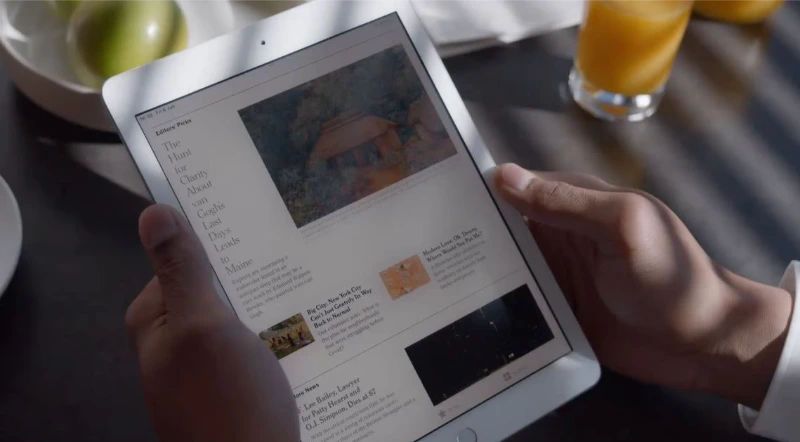
A book reader app is software that lets you read digital books, and often audiobooks and magazines, on a device you already own. Some are tied to a store, like Kindle or Kobo. Others let you load your own files in formats such as EPUB, PDF, and MOBI. A few, like Libby, connect to your public library.
The key difference between them is not looks. It is where your books live, which formats they read, whether they sync across your devices, and what they cost.
How to Choose a Book Reader App
Pick a book reader app by answering five quick questions. Match the app to your answers, and you will rarely go wrong.
The Best Book Reader Apps
These are the apps worth your time, each with the reader it serves best. All are legitimate, and most are free.
Kindle, Best for Amazon Books
The Amazon Kindle app is the natural choice if you buy from Amazon, and you do not need a Kindle device to use it. It runs on Android, iPhone, iPad, Windows, and Mac, and it can also display library books you send from Libby.
You get adjustable fonts, highlights, notes, a built-in dictionary, and syncing across every device signed into your account.
Google Play Books, Best Free App for Your Own Files
Google Play Books is the top free pick for people who want to read and sync their own books. You can upload your own DRM-free EPUB and PDF files and read them on Android, iPhone, the web, and more, with highlights, notes, and progress syncing automatically.
The catch is formats. For your own uploads it does not accept MOBI or comic files like CBR and CBZ, so convert those first. It does read comics and manga bought from the Google Play store, which use its own format.
Apple Books, Best for iPhone and iPad
Apple Books is the built-in reader on iPhone and iPad, and it is a clean, capable option for Apple users. It handles EPUBs and PDFs, syncs across your Apple devices through iCloud, and offers solid highlighting, notes, and themes. Many readers say its highlights and notes feel nicer than Kindle’s. The downside is that it is Apple-only.
Kobo, Best Non-Amazon Store
Kobo is the strongest alternative to Amazon’s ecosystem, for both ebooks and audiobooks. The app works on Windows, Mac, iPhone, iPad, and Android, and reads books from the Kobo store plus your own imported PDFs and EPUBs. Kobo Plus, its subscription, offers unlimited reading and listening, and usually includes a free trial.
Libby, Best for Free Library Books
Libby is the best way to read books completely free, using nothing but a library card. The app, made by OverDrive, lets you borrow ebooks, audiobooks, and magazines from your public library at no cost.
It is the most recommended free option by a wide margin in reader communities. Popular titles have a wait, but you can borrow plenty instantly. Our guide explains exactly how Libby works.
Moon+ Reader, Best for Android Customization
Moon+ Reader is a long-time favorite among Android readers who want control. It reads many formats, including EPUB, PDF, and MOBI, and offers deep customization of fonts, themes, brightness, and page turning. The free version is strong, and a cheap Pro upgrade adds more. Its main limit is that it is Android-only.
ReadEra, Best Free All-Rounder
ReadEra is a simple, ad-free reader that people stick with for years. It supports EPUB, PDF, MOBI, and more, organizes your library well, and can even read books aloud with a computer voice. Reader communities praise it as clean and genuinely free. The one common wish is more seamless syncing across devices.
KOReader, Best for Power Users and E-ink
KOReader is the power-user pick, free and open source, and it runs almost anywhere, including jailbroken Kindles, Kobo, Android, and e-ink devices. It handles nearly every format and can sync reading progress across devices with a sync server. The trade-off is a steeper learning curve, so it rewards readers who like to tinker.
Readest, Best for Cross-Device Sync
Readest is a modern, free, open-source reader built to solve the sync problem. It runs on iOS, macOS, Windows, Linux, Android, and the web, keeping your highlights, notes, and reading position in sync across all of them. It reads EPUB and MOBI, with experimental PDF support, plus text-to-speech and translation (GitHub).
PocketBook Reader, Best for Many Formats
PocketBook Reader is a versatile app for readers who juggle lots of file types. It supports a wide range of ebook and audiobook formats, pulls books from the cloud, and offers a PDF reflow feature that makes dense PDFs easier to read. It works on iPhone, iPad, and Android, and includes highlighting, notes, and read-aloud.
Best Book Reader App by Use Case
If you want a quick answer for a specific need, start here.
Best Free Book Reader App
Libby, for free library books, and Google Play Books, for reading and syncing your own files. Both cost nothing. If you want a free reader with no account tie-in, ReadEra and KOReader are excellent too.
Best for Syncing Across Devices
Google Play Books for a free, zero-setup option, and Readest if you want open-source sync across every platform. KOReader with a sync server is the power-user route. This is the single most common request from readers, and these three answer it best.
Best for Reading Your Own EPUB, PDF, and MOBI Files
Moon+ Reader, ReadEra, and KOReader all read your own files across many formats. Google Play Books handles EPUB and PDF but not MOBI. For a single app that reads nearly everything, KOReader or ReadEra is your safest bet.
Best PDF Book Reader App
PocketBook Reader stands out for PDFs thanks to its reflow feature, which makes fixed PDF text adjust to your screen. On iPad, dedicated PDF apps also do this well. For free, Librera and KOReader both handle PDFs capably.
Best Comic Book Reader App
For comics and graphic novels in CBR and CBZ formats, you need a dedicated comic reader, since mainstream apps like Google Play Books do not support them. Librera reads comic formats on Android, and comic-focused apps offer zoom, pan, and panel-by-panel modes.
Best for Reading Aloud (Text-to-Speech)
ReadEra and Readest both include built-in text-to-speech, so they can read your books aloud. For more natural voices, some readers pair a reading app with a dedicated text-to-speech tool. If you mainly want listening, see our guide to the best audiobook apps.
Book Reader Apps by Format
Formats trip people up more than anything else. Here is what the main free and popular apps handle, at a glance.
| App | EPUB | MOBI | Comics (CBR/CBZ) | Platforms | |
|---|---|---|---|---|---|
| Google Play Books | Yes | Yes | No | No | Android, iOS, Web |
| Kindle | Via Send to Kindle | Yes | Yes | No | Android, iOS, Windows, Mac |
| Apple Books | Yes | Yes | No | No | iOS, Mac |
| Moon+ Reader | Yes | Yes | Yes | Limited | Android |
| ReadEra | Yes | Yes | Yes | No | Android, iOS |
| KOReader | Yes | Yes | Yes | Yes | Android, e-ink, Linux |
| Readest | Yes | Experimental | Yes | Yes (CBZ) | iOS, Android, Win, Mac, Linux, Web |
| Librera | Yes | Yes | Yes | Yes | Android |
Format support and availability change over time, so confirm in each app’s store listing before you commit.
Reading Your Own Books and Files
If you already own ebook files, almost any app above except the store-locked ones will read them. Move the files to your phone or tablet, then import them inside the app. Apps like ReadEra, Moon+ Reader, and KOReader let you point to a folder and pull everything in.
For a large personal collection, many readers use Calibre on a computer to organize their library, fix metadata, and manage formats. If you bought a book from one store and want to read it in another app, you may need to remove its DRM first, which is legal to do with books you own in many places but varies by region.
E-ink vs Phone or Tablet
A book reader app works on any screen, but the screen itself matters for comfort. Phone and tablet screens are bright, backlit, and fine for shorter sessions. Many heavy readers prefer e-ink devices, like a Kindle, Kobo, or Onyx Boox, because the matte screen reduces glare and eye strain.
If you read for hours or before bed, e-ink is worth considering. For convenience and quick reading, the app on your phone is perfectly good.
Frequently Asked Questions
This guide draws on current app features, real reader discussions, and official sources, including Google and the developers of these apps. App features, prices, and availability change often, so confirm the latest details in each app’s store listing before downloading.